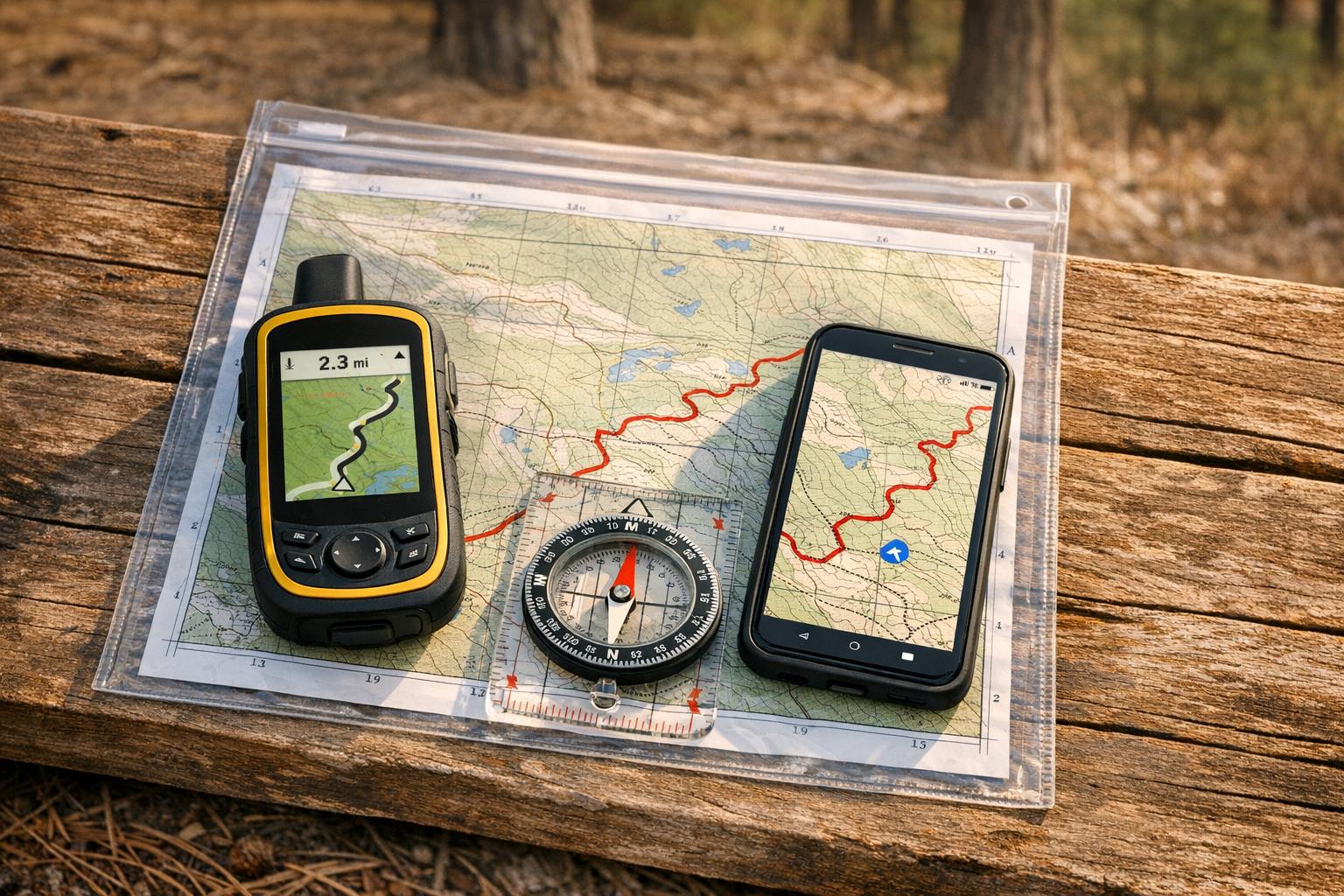
When venturing onto unmarked trails, reliable navigation tools can make the difference between a smooth ride and hours of frustration. Here’s what you need to know:
- Compasses and Topographic Maps: These never run out of battery and work in all conditions. Models like the Suunto MC-2 ($50–$80) are durable and precise, while paper maps provide terrain details without needing a signal.
- Garmin eTrex GPS Devices: With up to 650 hours of battery life in Expedition Mode, these handhelds are rugged and offer detailed offline maps.
- Trailforks App: A smartphone app with offline maps, heatmaps, and a "blue dot" feature to track your location. Subscriptions start at $53.99/year.
- Gaia GPS: Offers over 300 map layers and offline navigation. Premium costs $59.90/year, or $89.99/year with Trailforks.
- Garmin Fenix GPS Smartwatches: High-end wearables with preloaded maps, long battery life, and weather resistance. Prices range from $800–$1,199.
- Strava Route Creator: Ideal for pre-ride planning with heatmaps and manual route drawing. Offline navigation is available for $79.99/year.
- Natural Navigation: Techniques like using the sun, stars, and natural landmarks are battery-free and always available.
Quick Tip: Use a layered approach – combine a GPS device, offline apps, and a compass/map for maximum reliability. Always test your tools before heading out.
Top 5 Best Hiking GPS Devices in 2025 | Ultimate Guide for Outdoor Adventures
1. Compass and Topographic Maps
A magnetic compass paired with a paper topographic map is a navigation duo that doesn’t rely on satellites or electricity. When electronic devices fail, these tools remain dependable, especially on unmarked trails. Let’s dive into why they’ve stood the test of time for navigating diverse terrains.
Battery Life/Independence
Unlike electronic gadgets that rely on batteries, a compass works indefinitely. GPS apps on smartphones can drain batteries quickly, but a compass keeps going, no power needed. Take the Cammenga 3H, for example – it uses tritium micro-lights to stay illuminated for over 12 years without requiring a single battery change. Paper maps are equally dependable, needing no power at all, which makes them a lifesaver in remote areas where charging isn’t an option.
"Magnetic compasses never need charging, never lose signal, and never fail when you need them most." – CampGear360 Team
Offline Navigation Capability
Compasses and topographic maps shine where GPS devices might struggle. They don’t rely on satellite signals, so they’re effective in places like deep canyons or dense forests. A 1:24,000 scale topographic map provides detailed contour lines, showing features like ridges, slopes, and water sources – key for navigating unmarked terrain. Remember, even a small declination error can throw you off course. NOAA’s declination calculator is a handy tool to ensure accuracy.
Durability and Weather Resistance
Compasses are built to withstand extreme conditions, functioning in temperatures ranging from -50°F to 150°F. Compare that to smartphones, which can shut down at 15°F or even crack if dropped on rough surfaces. Models like the Silva Ranger 2.0 and Suunto MC-2, priced between $50 and $80, are designed to handle physical impacts and wet weather. As for paper maps, storing them in a zip bag or a transparent case keeps them safe from rain and wind.
Suitability for Unmarked Trails
When trails disappear, precision navigation becomes critical. Mirror sighting compasses, such as the Suunto M-3G Global Pro ($80), excel at triangulation and accurate bearing tracking . If you’re looking for a budget-friendly option, the Brunton TruArc 3 ($10–$15) offers global functionality and tool-free declination adjustment.
"I’ve seen GPS units die, screens crack, and batteries give out on long routes. That’s when a reliable navigational tool becomes the day’s hero." – Robert, Hikematic
2. Garmin eTrex GPS Handheld Device
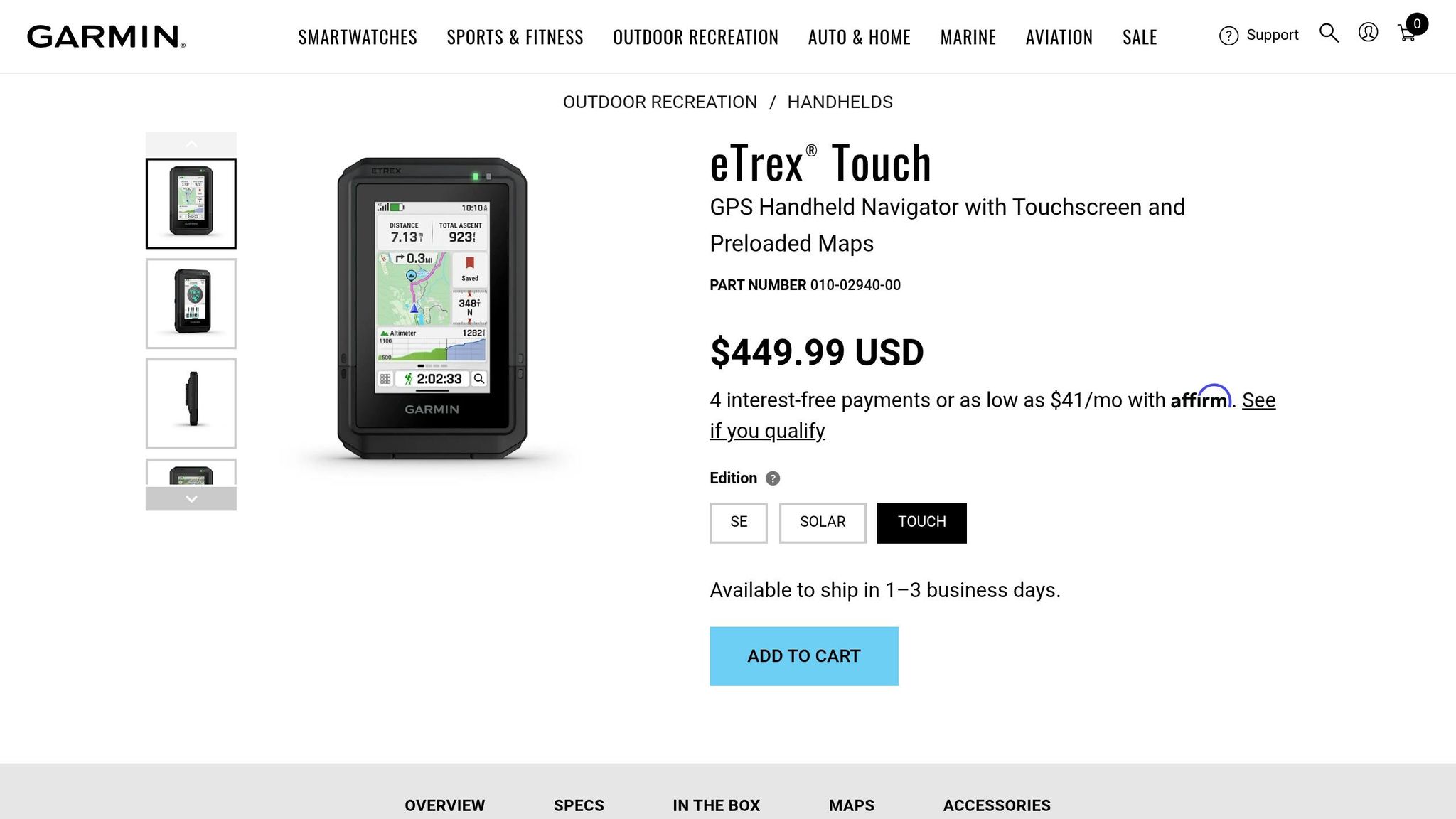
The Garmin eTrex series is a rugged, reliable choice for GPS navigation, especially when venturing off the beaten path. Unlike fragile smartphone screens, these devices are built to withstand the challenges of remote areas. The lineup includes the budget-friendly eTrex SE ($149.99), the versatile eTrex 32x ($299.99), and the more advanced eTrex Touch ($449.99). Each model offers dependable navigation, making it a solid companion for backcountry adventures.
Battery Life and Longevity
One of the standout features of the eTrex series is its impressive battery performance. Models like the eTrex 22x and 32x deliver around 25 hours of use on two standard AA batteries, with lithium AA batteries pushing that to 50–60 hours. The eTrex Touch takes things further, offering up to 130 hours in standard mode and an incredible 650 hours in Expedition Mode. The eTrex Solar can even achieve "unlimited" battery life in direct sunlight at 75,000 lux.
Offline Navigation Features
The eTrex series doesn’t just rely on batteries; it also boasts exceptional offline navigation capabilities. Modern models tap into multiple satellite systems, including GPS, GLONASS, Galileo, BeiDou, and QZSS, ensuring strong signal reception even in remote or challenging environments. The eTrex 32x and Touch come preloaded with TopoActive maps, which display terrain contours, elevations, and trails – essential tools for navigating off-trail. The eTrex 32x also features a 3-axis electronic compass for precise heading, even when stationary, and a barometric altimeter calibrated to within ±50 feet.
"The eTrex 32x is a powerful backcountry navigation device. You can get navigation instructions on the fly, routed by the device, or you can preplan your trip, load it on the eTrex, and make sure you’re following the path you planned." – Cris Hazzard, Hiking Guide
Built to Withstand the Elements
Durability is another strong point of the eTrex series. Physical buttons ensure functionality in rain, freezing temperatures, or while wearing gloves – situations where touchscreens often fail. The eTrex Touch meets MIL-STD-810 standards for ruggedness, and most models carry IPX7 or IP67 ratings, allowing them to handle brief submersion in water. Additionally, transflective displays remain easy to read in bright sunlight, ensuring visibility in all conditions.
Ideal for Off-Trail Exploration
When trails fade away, the eTrex series shines. It supports universal GPX file formats for routes and tracks, although transferring data requires a mini-USB or USB-C cable. To avoid data truncation, GPX files should be limited to 10,000 points. For mountain navigation, the eTrex 32x includes an elevation profile feature that’s especially helpful – something the eTrex 22x lacks. To protect the screen from scratches during storage, consider adding a screen protector.
3. Trailforks Smartphone App

Trailforks transforms your smartphone into a powerful navigation tool, giving you access to a database of over 650,000 trails across more than 90 countries. For mountain bikers tackling unmarked terrain, the app’s "blue dot" feature pinpoints your exact location, even without cell service.
Offline Navigation Capability
Trailforks lets you download entire regions for offline use, ensuring that maps and trail details are available even in the most remote backcountry areas. The offline GPS feature accurately shows your position, and the app’s compass mode rotates the map to align with your direction. This is especially helpful at tricky intersections where trails split or fade away. Plus, the "Record Your Ride" tool traces your path with a pink line, making it simple to retrace your steps if you lose track of the trail.
The app offers two subscription options: Trailforks Pro at $53.99 per year for worldwide offline access, and the Outside+ Bundle (which includes Gaia GPS) for $89.90 annually. A free version is available with a 14-day trial, after which you can select one "home" region for continued access. These offline features are a lifesaver when you’re far from connectivity.
Battery Life and Efficiency
Trailforks is impressively efficient when it comes to battery usage. In a three-hour ride, the app consumed only 4% of battery life. For longer adventures, you can extend your battery life by switching to airplane mode – your GPS will still function while conserving power by disabling cellular searches. Additional tips include lowering your screen brightness to 40–60% and setting your screen timeout to 30 seconds.
"When you’re 10 miles into unfamiliar singletrack and the sun’s setting, that blue dot is worth way more than $54." – AppPicker Review
Suitability for Unmarked Trails
Trailforks goes beyond basic navigation with features tailored for unmarked trails. Heatmap layers show the most frequently traveled routes, helping you identify established paths even without physical markers. The app also includes over 168,000 photos and videos, giving you a visual preview of trailheads and landmarks before you set out. Trail data is regularly updated using millions of user ridelogs, ensuring the maps reflect real-world conditions. For added safety, an emergency page provides your exact coordinates and location details for first responders – an essential feature when exploring remote areas.
4. Gaia GPS Mapping App
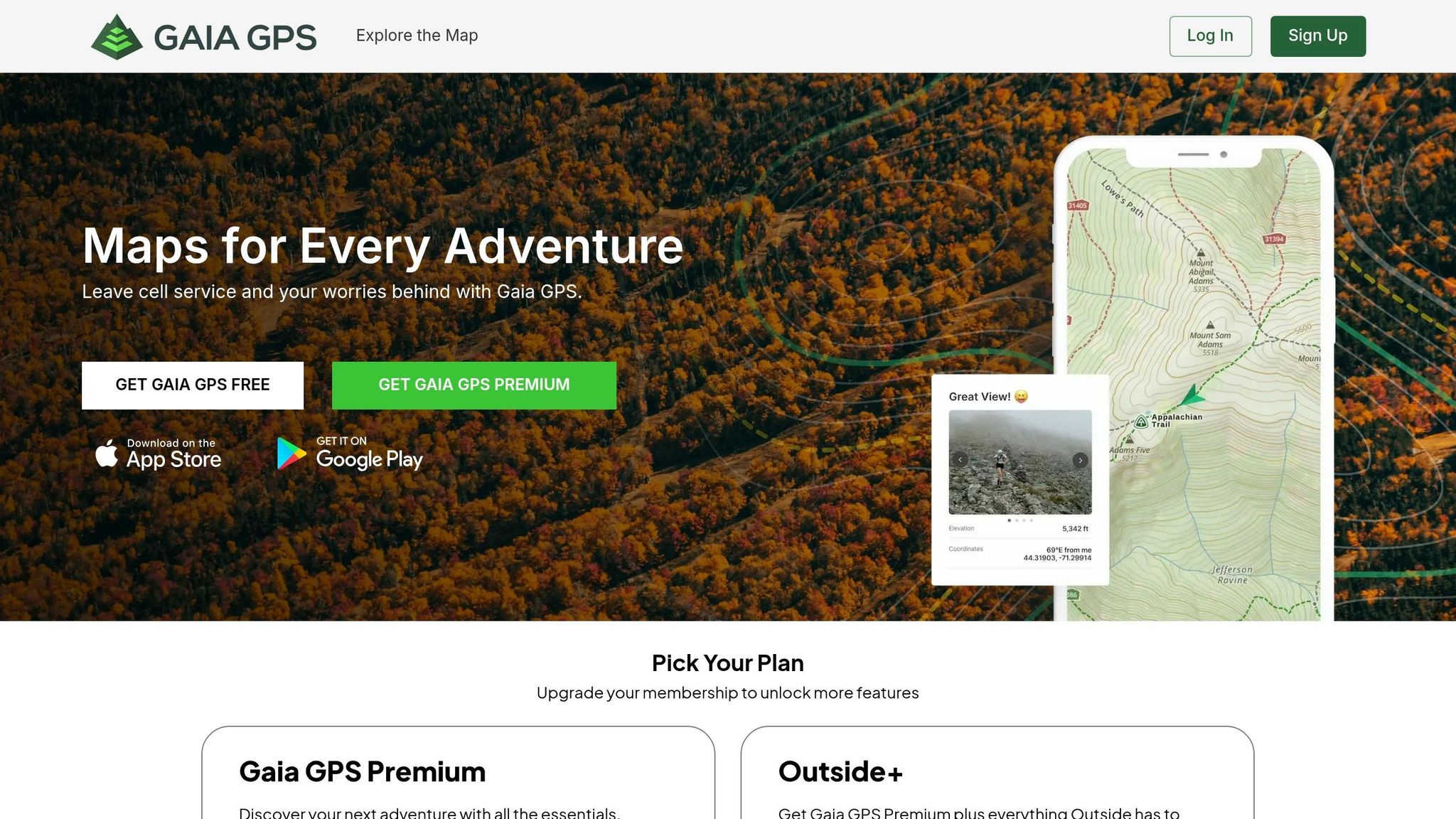
Gaia GPS turns your smartphone into a reliable, offline navigator tailored for backcountry adventures.
Offline Navigation Capability
Saving offline maps with Gaia GPS is straightforward. Tap the Layers icon, outline your riding area, choose High resolution, and enable offline route creation[31,35]. On iOS devices, keep the app open while downloading to avoid interruptions. Before heading out, switch to airplane mode and zoom in on the downloaded area to ensure the maps are clear and ready to use[31,35].
The app’s Gaia Topo layer is vector-based, allowing you to download extensive areas without hogging storage space. Premium members get access to over 300 map layers, including USFS topo maps, USGS quads, National Geographic Trails Illustrated maps, and high-resolution satellite imagery. These layers can be stacked to reveal fine terrain details. Plus, the app records your journey as a "breadcrumb trail", making it easy to retrace your path if conditions get tricky[34,36,37]. This offline functionality ensures you’re prepared for long, energy-efficient trips.
Battery Life and Efficiency
Once your maps are downloaded, managing your phone’s battery is key to keeping Gaia GPS functional on extended trips. In a May 2017 test, hiker Mark Warren used Gaia GPS on an older Android phone during a 6.5-hour hike in airplane mode, and it only drained 15% of the battery. To optimize battery life, use airplane mode, lower screen brightness, enable Low Power Mode, and set a short auto-lock interval[41,42,4]. Protect your phone from extreme temperatures – insulate it in cold weather and keep it out of direct sunlight in the heat. Always carry a USB battery pack for added peace of mind[41,42,4].
Suitability for Unmarked Trails
Gaia GPS shines when navigating unmarked or off-trail terrain. The Gaia Topo layer includes tree shading to help distinguish vegetation boundaries and treelines, providing a 3D-like perspective for better location awareness. Premium users can access slope data and land boundaries, which are crucial for safe and informed off-trail navigation[38,40].
"A watertight navigation strategy is at the core of backcountry safety – if you know where you are, you can find your way out of a number of unexpected situations." – Corey Buhay, Writer
Additional tools like the measure feature allow you to calculate distances instantly, while waypoint marking helps you identify landmarks, water sources, or campsites. For mountain bikers, the Outside+ subscription combines Gaia GPS Premium with Trailforks Pro, offering access to the largest mountain bike trail database alongside advanced mapping tools. Gaia GPS Premium costs $59.90 annually, and the Outside+ subscription is available for $89.99 per year. With these specialized features, Gaia GPS proves invaluable for navigating even when trails disappear.
sbb-itb-9d75ae1
5. Garmin Fenix GPS Smartwatch

The Garmin Fenix series turns your wrist into a personal navigation hub, complete with preloaded TopoActive maps that outline trails, streets, and key points of interest. It’s designed to guide you deep into the wilderness without needing your phone or a cellular signal.
Battery Life/Independence
The Fenix 8 delivers an impressive 56–78 hours of continuous GPS tracking when using multi-band and all GNSS systems. For even longer use, the Fenix 7X Pro Solar can stretch that to 89–122 hours in GPS mode. In standard smartwatch mode, you can go 2–3 weeks between charges. As Cris Hazzard, a hiking guide from HikingGuy.com, shares:
"In my real-world hiking use, I consistently get enough battery life to do long trips and backpacking trips without having to worry about charging." – Cris Hazzard, Hiking Guide, HikingGuy.com
To extend battery life further, you can switch to "GPS Only" mode, disable the Always-On display, turn off Pulse Ox monitoring, or use the "Resume Later" feature to pause tracking during breaks. Prices for the series range from around $800 for the Fenix 7 Solar to approximately $1,199 for the Fenix 8. This exceptional battery life supports its advanced navigation features seamlessly.
Offline Navigation Capability
Equipped with a multi-band GNSS receiver, the Fenix series supports GPS, GLONASS, Galileo, QZSS, and BeiDou, ensuring accurate location tracking even offline. You can create and follow courses directly on the watch, import GPX files, or sync hikes from AllTrails. The breadcrumb backtrack feature helps retrace your steps when needed. Additional tools like ClimbPro provide detailed ascent data, while Trendline popularity routing highlights commonly used paths – even on unmarked trails.
The Fenix 8 stands out with its 1,000-nit AMOLED screen and 454 x 454 pixel resolution, making topo lines and map symbols easy to read, even in direct sunlight. You can also lock the touchscreen during activities to prevent accidental taps, ensuring smoother navigation.
Durability and Weather Resistance
Built to meet military standards for thermal, shock, and water resistance, the Fenix 8 is made for tough environments. It has a 40-meter dive rating and features leakproof metal buttons designed for high-pressure situations. The sapphire lens option and titanium bezel provide added scratch resistance, while a metal sensor guard protects critical components like the barometer, microphone, and speaker from damage. These rugged features make it a reliable companion for tackling challenging trails.
Suitability for Unmarked Trails
The Fenix 8 shines in remote areas where trails are difficult to follow. Its SatIQ technology balances GPS accuracy and battery life, ensuring precise tracking even in deep canyons or dense forests. Barometric storm alerts warn of incoming weather changes, helping you stay prepared. For the best results on unmarked trails, it’s recommended to pre-plan routes in the Garmin Connect app rather than relying solely on the watch’s on-device routing.
"The addition of a touchscreen is the single best update in the fēnix 7 – Solar Edition… you can scroll the screen with your fingertip rather than using a combination of multiple buttons." – Craig Randall, Gear Editor, iRunFar
With its advanced features and rugged design, the Garmin Fenix is an essential tool for mountain bikers and outdoor enthusiasts venturing into unexplored terrain.
6. Strava Route Creator for Pre-Ride Planning
Strava’s Route Creator taps into data from over 100 million riders to build a Global Heatmap, highlighting popular routes and hidden off-road paths that typical maps might overlook. When you select "Mountain Bike Ride" as your activity, the algorithm prioritizes dirt trails and routes favored by the community over paved roads.
One standout feature is Manual Mode, which allows you to chart your own path through unmarked terrain. Whether you’re tackling off-road segments or exploring areas without mapped trails, you can draw freehand or connect points directly. As Loop.cc puts it:
"Manual Mode allows you to draw a direct line between two points, regardless of existing pathways. This is particularly useful for off-road segments where no clear path exists."
For added customization, subscribers can set waypoints to mark essentials like water stops, scenic viewpoints, or technical trail features. These waypoints sync with Garmin devices, providing "Up-Ahead" alerts during your ride. Another handy feature is the ability to view community photos pinned to specific map locations, helping you assess trail conditions before heading out. Together, these tools make navigating unmarked trails less daunting.
Offline Navigation Capability
Strava’s offline tools are a great backup for areas with no cell service. With a $79.99 annual subscription, you can download routes for offline use, making sure you stay on track even when you’re off the grid. While using offline navigation, enabling Airplane Mode can save battery life, as GPS tracking continues to work without cellular data. However, keep in mind that Strava’s app provides a basic route line (orange for planned, blue for actual) but lacks turn-by-turn voice guidance.
For a more reliable experience on unmarked trails, you can export your Strava route as a GPX file to a dedicated GPS device like the Garmin Edge 840. These devices offer features like over 26 hours of battery life, IPX7 water resistance, and audible turn alerts, which smartphones typically can’t match. As Average Joe Cyclist points out:
"Using the Strava app on my iPhone is a drain on my phone’s battery power. I have ended up with a dead phone in foreign cities because I was relying on my phone for mapping and recording."
This GPX export option combines Strava’s robust planning tools with the superior navigation capabilities of dedicated GPS devices, giving you a more dependable solution for your rides.
7. Natural Navigation Techniques
When your GPS fails or you lose cell signal in remote areas, natural navigation becomes your go-to strategy. These methods, rooted in observing the world around you, don’t rely on technology and work in places where satellites can’t help, like dense forests or deep canyons. As Tristan Gooley, an expert in natural navigation, puts it:
"Natural navigation is the rare art of finding your way by using nature – reading the sun, moon, stars, weather, land, sea, plants, and animals".
These techniques are not just old-school – they’re reliable backups when electronics let you down.
Battery-Free Reliability
Natural navigation is always available and doesn’t require batteries or charging. For example, an analog watch can help you find direction: point the hour hand at the sun, and halfway between that and 12 o’clock gives you a rough south. At night, you can locate Polaris (the North Star) by tracing a line through the pointer stars of the Big Dipper.
Offline Navigation in Any Terrain
The "handrail" technique is a practical way to stay on course without needing a signal. By following natural features like rivers, ridgelines, or treelines, you can maintain your direction. In foggy or low-visibility conditions, the CMF (Close-Middle-Far) principle is invaluable. It involves scanning for obstacles within 25–50 feet, identifying intermediate landmarks 100–500 feet away, and using major peaks or features beyond 500 feet to orient yourself. As Philip Werner, founder of SectionHiker, explains:
"The device you use is irrelevant as long as you can count on it to be functional when you need it. The truth is that experienced navigators need a compass or GPS a lot less frequently than you’d imagine".
Navigating Unmarked Trails
When trails vanish, natural clues can guide you:
- Equal-Length Shadow Method: Place a stick upright in the ground and mark the tip of its shadow in the morning. Draw an arc around the stick, and in the afternoon, mark where the shadow touches the arc again. The line connecting these two points runs East-West.
- Tick Effect: In the Northern Hemisphere, isolated trees often have denser, more horizontal branches on their south-facing side due to increased sunlight.
- Treeline Elevation: Trees stop growing at specific altitudes, which vary by region. For example, in northern climates, the treeline is around 5,000 feet, while in the Sierra Nevada, it’s closer to 9,000–10,000 feet.
While some believe moss only grows on the north side of trees, that’s a myth – it grows wherever conditions are damp. Sun-based methods are much more dependable.
Natural navigation techniques may take practice, but they’re invaluable when technology isn’t an option.
Tool Comparison Table
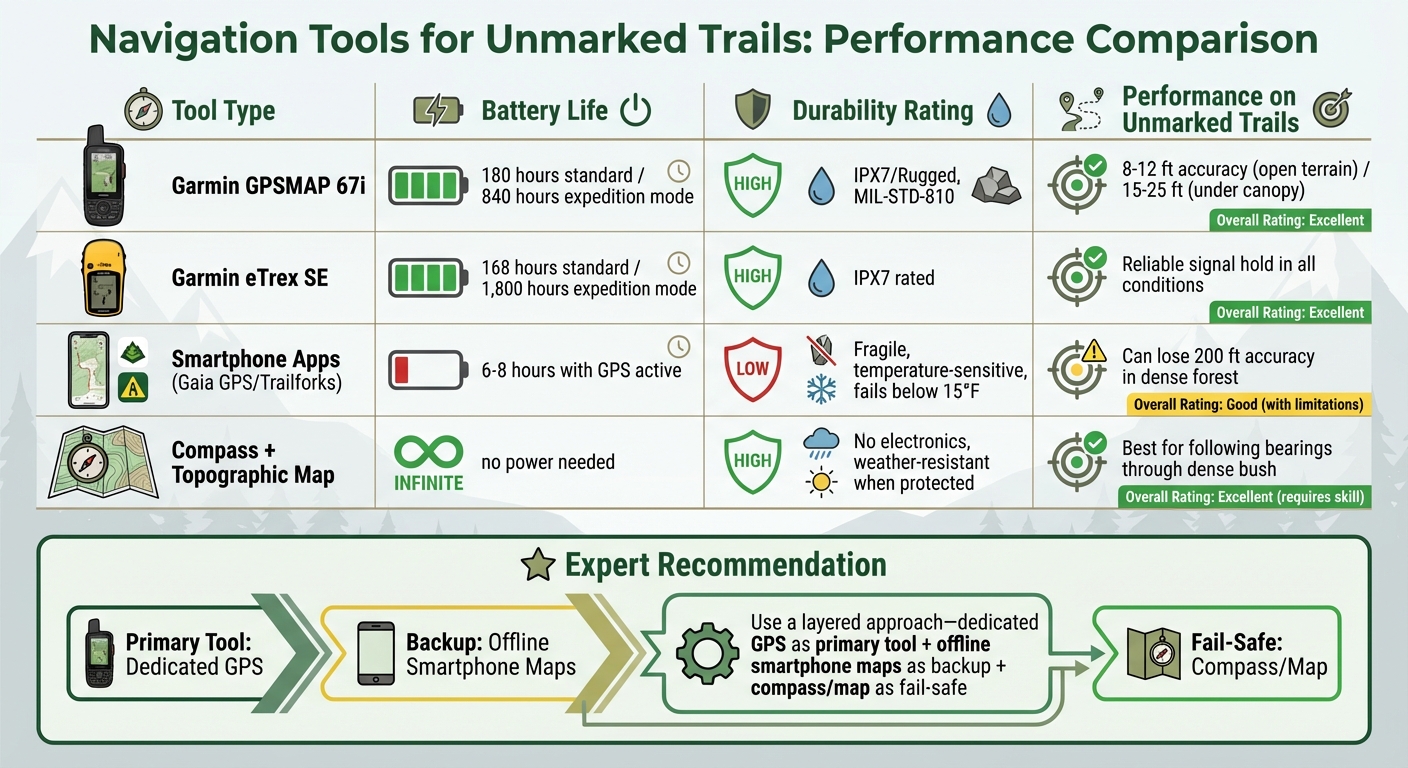
Navigation Tools Comparison: Battery Life, Durability and Performance for Unmarked Trails
When selecting navigation tools, consider factors like battery life, offline functionality, durability, and how well they perform under dense canopy conditions.
Dedicated GPS handhelds excel in battery endurance. For instance, the Garmin eTrex SE offers 168 hours of runtime in standard mode, which extends to an impressive 1,800 hours in expedition mode with just two AA batteries. Meanwhile, the GPSMAP 67i provides 180 hours in standard mode and 840 hours in expedition mode. As gear expert Sean Nelson points out:
"A modern handheld GPS runs 30-200+ hours on a charge or a set of AAs. Your phone? Maybe 6-8 hours with the screen on and GPS active, less in cold weather."
Durability is another key factor. Devices designed to meet MIL-STD-810 or IPX7 standards can withstand drops and brief water exposure up to 3 feet. In contrast, smartphones are prone to cracking and struggle in freezing temperatures below 15°F.
| Tool | Battery Life (Standard) | Offline Use | Durability | Performance on Unmarked Trails |
|---|---|---|---|---|
| Garmin GPSMAP 67i | 180 hours | Excellent (Multi-band GNSS) | High (IPX7/Rugged) | 8–12 ft accuracy in open terrain; 15–25 ft under canopy |
| Garmin eTrex SE | 168 hours | Good (with breadcrumb tracking) | High (IPX7) | Reliable signal hold |
| Smartphone Apps (Gaia/Trailforks) | 6–8 hours | Requires pre-downloading | Low (Fragile, temp-sensitive) | Can lose accuracy by about 200 ft in dense forest |
| Compass + Topo Map | Infinite | Native | High (No electronics) | Best for following bearings through dense bush |
Signal reliability is crucial when navigating unmarked trails. Multi-band GPS devices connect to multiple satellite systems like GPS, GLONASS, Galileo, and BeiDou, maintaining a strong signal even under heavy tree cover. Smartphones, on the other hand, often lose accuracy in these conditions. For extended trips where recharging isn’t feasible, tools powered by replaceable AA batteries are a more practical choice than relying on power banks.
This table underscores the strengths and weaknesses of each tool, helping you decide which is best suited for navigating challenging, unmarked terrain.
Conclusion
Choose navigation tools that match your riding style and the conditions you’ll face. For multi-day rides, prioritize devices with a battery life of 40–120+ hours instead of relying on smartphones, which typically last only 6–8 hours when running GPS. In remote areas, devices with satellite SOS features should be considered essential for safety.
A layered approach works best: use a dedicated GPS as your main tool, back it up with offline smartphone maps, and carry a paper map and compass as a fail-safe. As gear expert Sean Nelson advises:
"A phone is not a substitute for a dedicated GPS in real backcountry conditions. I’ve seen phones shut down at 15°F, watched batteries drain in 4 hours with GPS active, and witnessed screens become unreadable in direct sun."
Before heading out, practice using your equipment. Ride a familiar loop and intentionally miss a turn to test rerouting capabilities, then try a new trail close to home. This helps you build confidence and uncover any quirks in your gear before venturing into the backcountry.
Check that offline maps load properly before your trip. At the trailhead, calibrate your altimeter, adjust screen brightness to save battery, and regularly compare your position to major landmarks to stay oriented. These small steps can make a big difference in preventing you from getting lost.
For more complex off-trail navigation, detailed topographic maps are crucial, while breadcrumb trails often suffice for marked but unmaintained routes. Tailor your navigation setup to the terrain and practice beforehand to ensure a smooth and safe ride.
FAQs
What’s the best navigation setup for unmarked trails?
When heading out on unmarked trails, the best approach involves using a topographic map, a baseplate compass, and a dependable GPS device. Maps and compasses are crucial for understanding the landscape and maintaining your bearings, especially if your electronic devices stop working. GPS devices, on the other hand, provide precise navigation and detailed mapping, which can be a lifesaver in remote or unfamiliar areas. Regularly practicing with these tools is key to building confidence and ensuring you can rely on them when it matters most.
How do I keep my phone GPS working longer offline?
To make the most of your phone’s GPS while hiking on unmarked trails, download offline maps before your trip. This not only ensures you have access to navigation but also helps conserve battery life. Once you’re ready to hit the trail, turn off features like cellular data, Bluetooth, and WiFi. Using airplane mode can further reduce unnecessary power usage.
Another handy tip? Lower your screen brightness and keep the screen off when you don’t need it. These small adjustments can stretch your battery life significantly. And if you’re planning a longer adventure, don’t forget to pack an external battery pack. It’s a lifesaver for recharging your phone when you’re far from any outlets.
When should I use a compass and paper topo map instead of GPS?
Using a compass and a paper topographic map can be a lifesaver when electronic devices fail. Whether you’re dealing with poor signal, dead batteries, or a malfunctioning device, these tools offer a reliable way to navigate. This is particularly important in remote wilderness areas where GPS signals are often weak. A map and compass aren’t just old-school – they’re essential for staying safe in unpredictable environments.